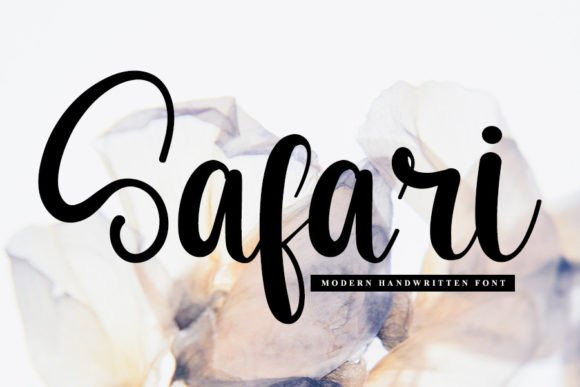
Safari Font: Elegant Script for Business
As a small business owner, I know how important it is to create a strong brand presence. Every detail matters, from the colors you choose to the fonts you use. That’s why I’m excited to share how Safari, a beautiful handwritten font, can elevate your brand across all your materials.
Safari has a soft, elegant touch that feels both modern and timeless. It’s not just a font—it’s a style that brings personality to your work. Whether you’re designing a logo, creating social media posts, or printing product labels, Safari adds a unique flair that stands out without being overwhelming.
Why Safari Matters for Branding
Consistency is key when building a brand. Using a single, cohesive font across all your materials helps customers recognize your business instantly. Safari works well as a headline font or an accent typeface, making it easy to integrate into your design system.
For example, if you run a boutique or sell handmade products, Safari can be used on packaging, tags, and even your website. Its flowing lines and gentle curves give your brand a warm, inviting feel—perfect for businesses that want to connect with their audience on a personal level.
Real-World Applications of Safari
Let’s talk about how Safari can be used in everyday business scenarios. Imagine you’re a café owner looking to update your menu. Using Safari for the headings and special items can add a stylish touch that makes your menu feel more curated and professional.
Or think about a beauty brand that wants to stand out on shelves. Safari can be used on product labels, giving them a handcrafted, artisanal look. It also works well for thank-you cards, stickers, and promotional flyers, helping your brand feel more connected and authentic.
If you’re a coach or service provider, Safari can be used in your email signatures, website banners, or social media graphics. It adds a human element that makes your brand feel more approachable and trustworthy.
When to Use Safari
Safari shines as a display font or a logo font. It’s ideal for headlines, titles, and short phrases where visual impact matters. However, it’s not the best choice for long blocks of text due to its script style. That’s where font pairing comes in.
Pairing Safari with a clean sans serif or serif font can create a balanced look. For instance, using Safari for your logo and a simple sans serif for body text ensures your message is clear while still maintaining a stylish appearance. This combination works especially well for websites, marketing emails, and printed materials.
Readability and Practicality
One thing I always consider is how a font performs in real-world situations. Safari is readable at smaller sizes, which is great for product labels, business cards, and mobile screens. It also holds up well in print, making it a reliable choice for packaging and stationery.
When testing Safari, I recommend trying it in different sizes and contexts. Print a sample label or create a mock-up of your website to see how it looks in action. This helps ensure it fits your brand’s needs and maintains clarity across all platforms.
Font Pairing Tips
Font pairing can make or break your design. Safari pairs well with many other fonts, especially those that offer contrast. A modern sans serif like Montserrat or a classic serif like Georgia can complement Safari’s elegance without clashing.
For digital ads or social media content, try using Safari for headlines and a simpler font for captions. This creates visual hierarchy and keeps your designs clean and focused. Always test your pairings in the actual environments they’ll be used in, like Instagram posts or email templates.
Commercial Licensing and Usage
Before using Safari across your brand, make sure you understand the commercial licensing terms. If you plan to use it on products, packaging, or client work, check that you have the proper rights. This is especially important if you’re selling digital downloads or creating templates for others.
As a business owner, it’s crucial to stay compliant with font licenses. Safari, as part of the Script Amp collection, offers a range of options for creative professionals who want to enhance their branding without legal complications.
Whether you’re starting a new business or rebranding an existing one, Safari offers a versatile, stylish solution for your design needs. Its elegant, handwritten look can help your brand feel more professional, consistent, and memorable—without sacrificing creativity or clarity.